
Dear beta users,
we're well aware that everyone's minds are elsewhere during these challenging times and we hope that you and your loved ones are safe and healthy. Like most in our industry, here at Lesspain our priority is to keep our team and families safe and we're lucky enough to be able to work from home to bring you the private beta of the latest Kyno version 1.8. It's 98% feature-complete with a number of major improvements and new features (see release notes at the end of this email).
We've created a few videos showcasing the new features and we're working on more videos to follow in the coming weeks. Please find the links below.
We would really appreciate active feedback, especially regarding the topics BRAW, Resolve integration (Mac only) and Avid Media Composer integration as we would like to include as much finetuning and bug fixes that result from that in Kyno 1.8 as possible.
You can use your regular Kyno license or just do a regular trial. If anyone needs a temporary license, please let us know and we will provide one.
We are looking forward to your feedback. This is one of the key things that shape Kyno and make it more powerful and we are very grateful for that.
Stay safe and healthy, everyone.
The Lesspain/Kyno team
Preview of the new Resolve integration in Kyno (Mac-only)
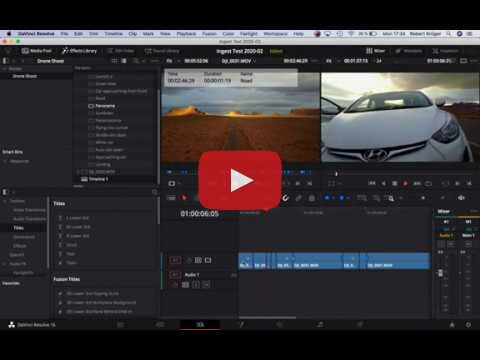
Preview of the new Avid Media Composer Workflows

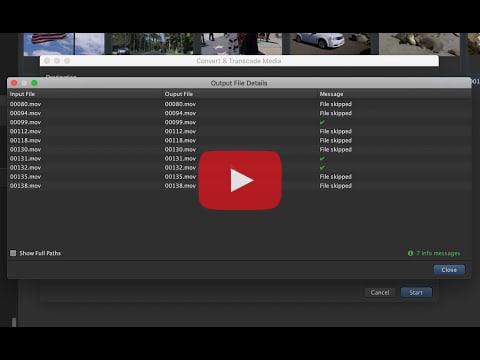
Preview of the new incremental batch transcoding workflow
Full Release Notes
What's New (all editions):
- Mac only: Integration with DaVinci Resolve - use the same simple "Send to" workflow you already know from our Final Cut Pro and Premiere Pro integrations to import clips with metadata like markers & subclips to DaVinci Resolve (Send To > DaVinci Resolve... or Cmd-Shift-D)
- New incremental transcoding workflow - transcode entire directory structures without worrying what you already transcoded last time, great for proxy or dailies workflows
- Reconnect metadata that has been lost due to accidental file name changes for example (main menu > File > Recover Lost Metadata...)
- Kyno now detects sidecar LUT files common with on-set color grading workflows using FIlmLight's Daylight for example - just place the 3D LUT next to the clip with the same name (e.g. "0001.cube" next to "0001.mov") and Kyno will automatically apply that LUT during playback
- We've reorganized the context menu for files, putting our most popular features to the foreground. The "Export"-menu was split up into the new top-level items "Export Subclips", "Export Markers as Stills" and "Export Metadata"
- Transfer metadata between copies of entire folder structures by a simple copy & paste operation using "Copy" and then "Paste metadata..." from the file context menu
- We've added a browser column for "Date Recorded" - the date extracted from clip metadata not from file creation or modification timestamps. The corresponding renaming variables are also available
- A browser column for the file path was also added
- The Excel export now includes the following metadata: Date Created, Date Modified, Date Recorded, File path, File size, Reel, Scene, Shot, Take. Total number of clips and total duration are also exported
- Added playback and decoding support for Grass Valley HQ and HQX (formerly Canopus HQ)
- Drop files on the "Browser"-area to copy them into the currently selected folder
- Allow drag and drop of single clips from Final Cut Pro to Kyno triggering import of metadata for that clip
- Import and export the camera name metadata from and to Final Cut Pro (XML)
- Allow importing legacy Final Cut Pro XML files (version 1.3) that are generated by 3rd party on-set systems such as LockitNetwork
- Improve debugging tools available to users when troubleshooting
- Allow advanced users to disable file system event monitoring for network, local or removable drives
What's New (Premium edition):
- Blackmagic RAW support (playback and transcoding)
- Integration with Avid Media Composer - send clip metadata to Media Composer using ALE and copy & paste markers from Kyno to Media Composer
Improvements
- Metadata is now automatically updated while in list or thumbnail view, improving collaborative workflows on shared storage or remote collaboration using Dropbox or Google Drive
- Kyno now carries over the content creation date metadata (aka date recorded) to MOV containers during conversion
- Files are automatically indexed after verified copying, improving browsing speed after offloading
- Improved performance of thumbnail extraction when low-res decoding is supported (RED RAW R3D, Blackmagic RAW)
- Improved general indexing performance under certain circumstances
- No longer display a warning in the transcoding dialog that a new folder will be created - we admit this was confusing :-)
- Offloaded media files are automatically indexed and cached thumbnails and metadata are copied automatically
Fixes:
- Fixed a bug that caused very short RED RAW R3D clips not to play back
- Fixed an issue causing descriptive metadata changes not to be visible immediately on some forms of shared storage
- Fixed a regression that caused cancel buttons to disappear from preanalyze and other progress dialogs
- No longer allow empty file names in naming controls for batch renaming or transcoding
 |  |  |  |
Heidelberger Str. 129 ½
64285 Darmstadt
Germany